The Preliminary Task
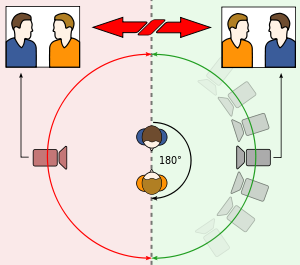 |
| Illustration of the 180° rule. |
The 180° rule is a rule that states the camera should stay on one side of a conversation without crossing the line, this is to ensure that the viewer does not become confused. The line can be crossed as long as the camera is shown switching sides. We incorporated this into our video by ensuring that we abode be the rule throughout our video, a good example of it's use is when The Commodore and Agent X were having a conversation
An eye line match is when the camera and characters are in such a position that it looks as though the eye-lines of the characters involved match. It ensure that conversations do not look ridiculous as the people are at the same height, not one looking 7 foot and the other looking 4 foot. We did this in our video during the conversation between Agent X and The Commodore. Both character's eye lines matched throughout the conversation.
The film making process went very well, although not without trouble, for example, the noise level around the college meant that there was occasionally some ambient noise that we did not want in the background of some of the takes, this meant we had to re-shoot one of the shots.
As we only stuck to the one room around the college, we did not have much trouble with people wandering into the background of the take. In terms of the storyboard, we got most of the shots that we wanted. We were unable to get an area around the college that was as dark as we wanted and even editing could not make it dark enough without making it obvious that it had been edited.
Adobe Premiere was a good program to use, although difficult to master at times, once i discovered how something was done it was an enjoyable experience. I can now confidently edit video and sound with suitable transitions. Transition such as fade ins and fade outs, which I used during the opening credits rather effectively.

No comments:
Post a Comment